A deep dive into scalable, policy-driven data protection with VMware vSphere tags
Introduction
As virtual environments grow in scale and complexity, traditional backup methods like manually selecting VMs or relying on static folders quickly become inefficient and error-prone. With hundreds or thousands of workloads spread across clusters, relying on traditional VM-by-VM backup configuration introduces risk, inconsistency, and operational overhead. This is where VMware vSphere tags integrated with Veeam Backup & Replication provide a modern, dynamic, and highly scalable approach to workload protection.
Tags act as logical labels that group workloads based on business context (e.g., SLA, Application, Department), enabling policy-based automation for backup and disaster recovery (DR). Instead of managing backups at the VM level, you manage intent, and Veeam handles the rest.
Tag-based backups shift your strategy from:
❌ “Select VMs to protect”
to
✅ “Define policies and let protection follow workloads automatically”
What Are Tags in Veeam (vSphere Context)?
A vSphere tag is a metadata label applied to objects like virtual machines, datastores, or hosts. These tags can then be used in Veeam to define backup scope, job membership, and recovery orchestration.
Here are some examples of Service Providers using Tags in their environment:
- Tag: Gold Tier – 4hr RPO
- Tag: SQL Production
- Tag: Do Not Backup
Instead of adding VMs into jobs, you assign tags and Veeam handles inclusions automatically. Veeam can use these tags to automatically include or exclude workloads in backup jobs.
Architecture Overview
Here’s how tag-based backup logic works:
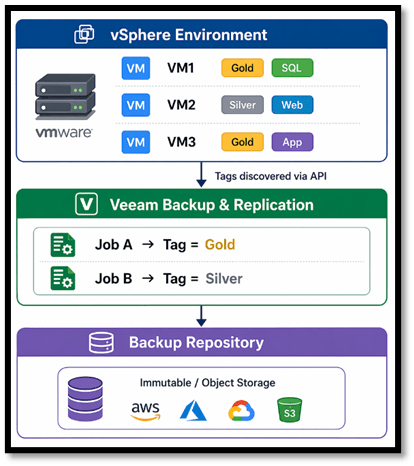
Key idea: Veeam doesn’t track VMs, it tracks tags.
Key Reasons to Use Tags for Veeam Backups
1. Automation and “Set-and-Forget” Backup Policies
One of the biggest advantages of tag-based backups is automation.
When you create a Veeam job based on a tags:
- Any VM assigned that tag is automatically included in the job
- Newly provisioned VMs are instantly protected without manual intervention
This eliminates the risk of:
- Forgetting to add new VMs to backup jobs
- Human error in large environments
Tag-based jobs ensure VMs are always backed up to the policy you set once the tag is applied.
2. Scalability for Enterprise Environments
In large environments with hundreds or thousands of VMs:
- Managing backups per VM becomes unmanageable
- Static groupings (folders/resource pools) don’t scale well
Tags allow:
- Dynamic grouping across infrastructure boundaries such as clusters, folders, and Datastores
- Logical organization independent of physical layout
This makes it easier to:
- Standardize backup policies
- Scale operations without redesigning jobs
Tags provide a centralized way to group infrastructure based on organizational needs, improving manageability at scale.
3. Policy-Based Backup and SLA Alignment
Tags enable backup strategies aligned to business requirements such as:
- RPO (Recovery Point Objective)
- RTO (Recovery Time Objective)
- Application criticality
Example tagging model used by Service Providers:
- Tier 1 – 1hr RPO
- Tier 2 – 4hr RPO
- Tier 3 – 12hr RPO
- Dev/Test – Daily Backup
Veeam jobs can then be mapped directly to these tags, ensuring:
- Consistent SLA enforcement
- Simplified compliance and auditing
Tags allow filtering and job configuration based on categories like department or SLA level.
4. Simplified Disaster Recovery (DR) Orchestration
Tags play a critical role in Veeam Recovery Orchestrator:
- Automatically include VMs in recovery plans
- Define recovery groups by application
- Map recovery resources efficiently
From the Melissa Palmers blog (https://www.veeam.com/blog/5-essential-vmware-vsphere-tag-tips.html):
- Selecting a tag can add all related VMs to an orchestration plan instantly
- Tags simplify assigning permissions and scopes for application owners
Additionally:
- Tags can define recovery locations (compute and storage)
- Enable DR even in isolated environments with minimal dependencies
5. Improved Application-Centric Backup Strategy
Modern environments are application driven and not VM driven.
Tags allow you to:
- Group VMs by application (e.g., SAP, SQL, WebApp)
- Protect entire application stacks consistently
Benefits:
- Easier recovery of multi-tier applications
- Alignment with business services rather than infrastructure
6. Flexibility with Multi-Dimensional Tagging
Unlike folders, tags allow multiple classifications per VM.
A single VM can be tagged with:
- Production
- SQL
- Tier 1
This enables:
- Granular backup policies
- Advanced filtering using tag combinations
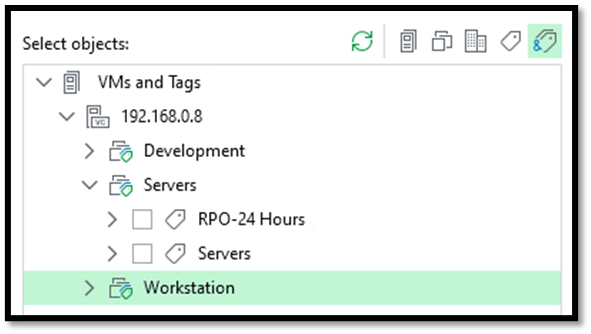
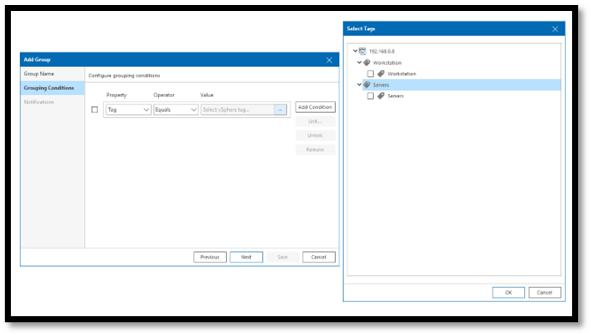
Veeam supports selecting single or multiple tags to define job scope, including combinations for precise targeting.
7. Faster Job Configuration and Reduced Complexity
Instead of:
- Creating dozens of backup jobs
- Manually maintaining VM lists
You can:
- Create fewer jobs
- Assign tags once
- Let Veeam dynamically manage scope
Tags significantly simplify job creation and ongoing maintenance.
8. Better Governance and Delegation
Tags allow controlled delegation:
- Grant access to specific tagged workloads
- Enable application owners to manage their own DR plans
Using tags with orchestration tools allows safe self-service without over-permissioning.
9. Enhanced Visibility and Reporting
Tags improve visibility by:
- Categorizing workloads logically
- Enabling reporting based on tags
For example:
- “Which Tier 1 VMs are protected?”
- “Which workloads belong to Finance?”
This improves:
- Compliance reporting
- Audit readiness
Best Practices from Veeam (vSphere Tag Tips)
Based on the Veeam blog “5 Essential VMware vSphere Tag Tips”, here are some helpful guidelines:
1. Plan Before You Tag
- Use meaningful names (e.g., Backup – 24 Hour RPO)
- Avoid generic labels like “TagABC or 123”
2. Use Tag-Based Backup Jobs
- Build jobs around tags, not individual VMs
- Ensure automatic inclusion of new workloads
3. Tag Applications
- Group VMs by application
- Simplify orchestration and DR planning
4. Tag Recovery Resources
- Tag datastores and hosts for DR mapping
- Simplify recovery configuration
5. Use Veeam ONE Business View
- Automate tag creation based on conditions
- Achieve granular and intelligent tagging
When NOT to Rely Only on Tags
While tags are powerful, they are not a silver bullet:
- Some backup settings apply at job level (not per VM)
- Complex environments may still require multiple jobs
- Poor tag design can lead to “tag sprawl”
Proper governance and naming standards are essential.
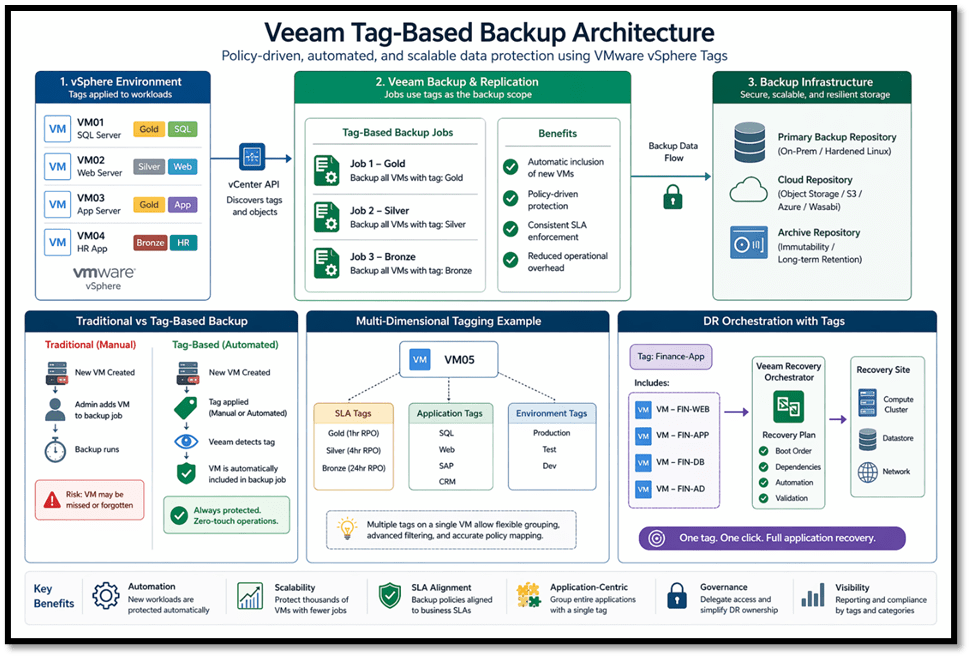
Here is an infographic on Veeam Tag-based Architecture I’ve put together to summarize everything mentioned above.
Final Thoughts
Using tags in Veeam transforms backup from a manual, VM-centric process into an automated, policy-driven framework.
Key Takeaways:
- Tags enable automatic workload protection
- They provide scalability and flexibility
- They align backups with business SLAs and applications
- They simplify disaster recovery orchestration
- They reduce operational overhead and human error
In modern environments especially those leveraging VMware vSphere, tag-based backup strategies are no longer optional; they are a best practice for achieving efficient, resilient, and scalable data protection.
Published: April 23, 2026 1:30pm
 Zamaan's Tech Blogs
Leave a comment