As ransomware attacks evolve beyond simple encryption to targeting backups directly, modern data protection architectures must assume credential compromise and administrative takeover as a baseline threat model.
This is where combining Veeam’s immutable backup capabilities with Wasabi’s Covert Copy delivers a compelling security architecture. Wasabi Covert Copy is an immutable data protection feature from Wasabi Hot Cloud Storage designed to protect backups from deletion, tampering, or ransomware, even if an attacker gains full administrative access.
What is Wasabi Covert Copy?
Covert Copy creates a static, one-time copy which is a hidden, immutable copy of data written to a Wasabi bucket. Covert copy does not provide ongoing replication of the Wasabi source bucket but rather is a “Golden Copy” of your data for use in case of a disaster that affects other copies of your data.
Key characteristics of Wasabi’s Covert Copy:
- Hidden from standard users and admins – isolated/hidden bucket from all API and user interface access without MFA and MUA approval.
- Time-based immutability – data is locked and cannot be deleted for a minimum of 30 days. Auto-renews if this option is enabled.
- Out-of-band protection – cannot be altered or deleted through normal access paths
- Survives credential compromise – even root/admin access cannot remove Covert Copy Bucket without MFA & MUA approval.
Think of Covert Copy as having Tapes, your last-resort, air-gapped recovery layer inside Wasabi.
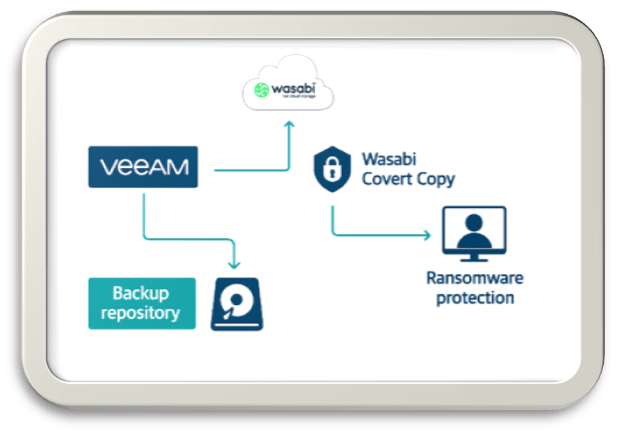
Benefits of Using Wasabi Covert Copy with Veeam
1. Ultimate Ransomware Protection
This design embraces an assume-breach mindset where:
- Veeam infrastructure has been compromised
- Backup repositories have been deleted
- Cloud credentials have been compromised
- The Covert Copy remains untouched and recoverable
This aligns perfectly with Veeam’s Zero Trust Data Resilience (ZTDR) model.
2. Alignment with Veeam’s 3-2-1-1-0 Rule
Veeam recommends:
- 3 copies of data
- 2 different media types
- 1 offsite
- 1 immutable copy
- 0 recovery errors
By using Wasabi Covert architecture, this strengthens:
- 1 offsite copy (Wasabi)
- 1 immutable copy (Either on-premise or Wasabi with Object Lock)
- 1 isolated copy (Covert Copy isolated from primary credentials)
- 0 errors (through Veeam’s Sure Backup & Secure Restore)
Effectively giving you a “1-1-1” hardened copy of your data.
3. No Change to Veeam Workflows
- Works natively with Veeam S3-compatible object storage
- No changes to:
- Backup jobs
- Retention policies
- Restore workflows
- Covert Copy is transparent during normal operations i.e. bucket cannot be seen unless the bucket has been put into “Restore Mode” by Wasabi support.
4. Compliance & Regulatory Benefits
Helps meet requirements for:
- Cyber resilience frameworks
- Regulatory retention mandates
- Audit evidence of unalterable backups
- Executive and board-level risk reduction
- Recovery Scenarios
Lets look at some scenarios where Covert Copy can come in handy:
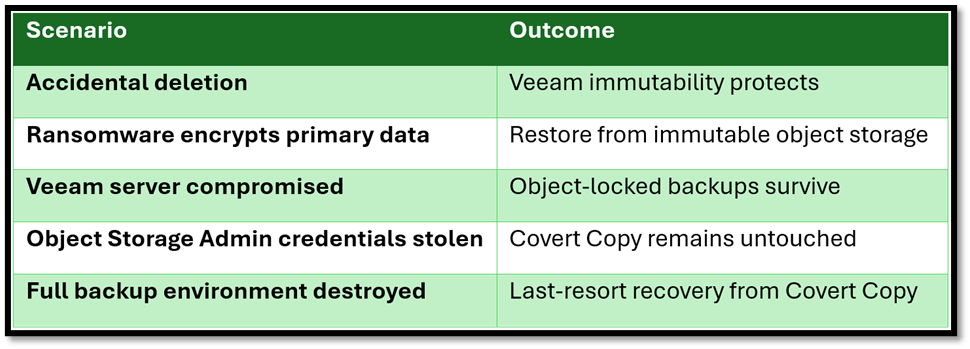
In the following section, I’ll go through the process of setting up a Covert Copy bucket in Wasabi and then creating a repository using the Covert Copy bucket in Veeam.
Setting up a Covert Copy bucket in Wasabi
- Login into the Wasabi Console Portal – console.wasabisys.com using your credentials
- Click on Buckets from the left-hand pane.
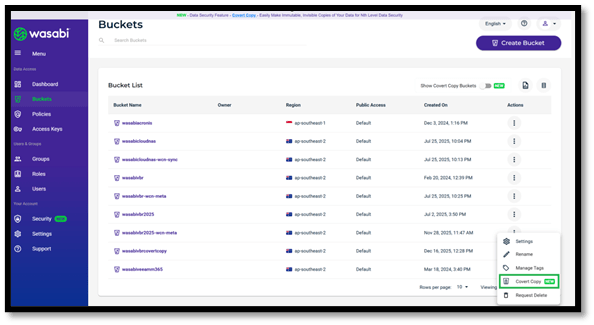
- Click on the three dots on the right-hand side under the Actions column for the bucket you would like to create a Covert Copy of.
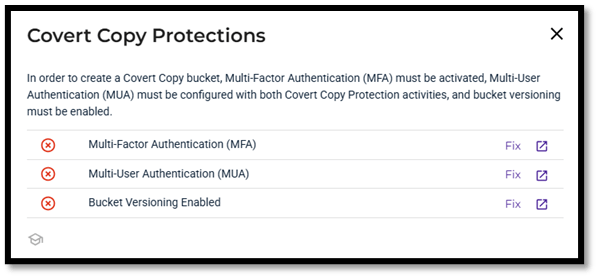
- If you do not have Multi-Factor Authentication, Multi-User Authentication and Bucket Versioning enabled, you will need to set this up before you will be able to proceed to the next step. Click on Fix for each feature and this will take you through the steps to enable the security features required for Covert Copy.
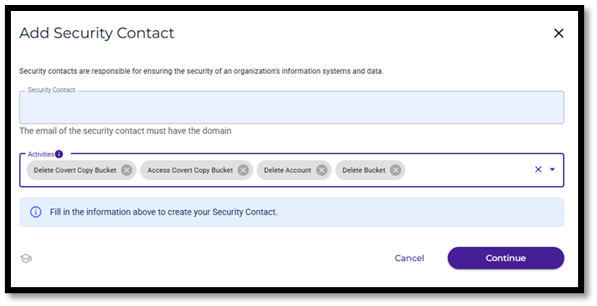
- Enter email address of the security contact which must match the root account domain. You can also specify what activities the security contact will be required to approve. In the example above, I have selected all four options available from the list.
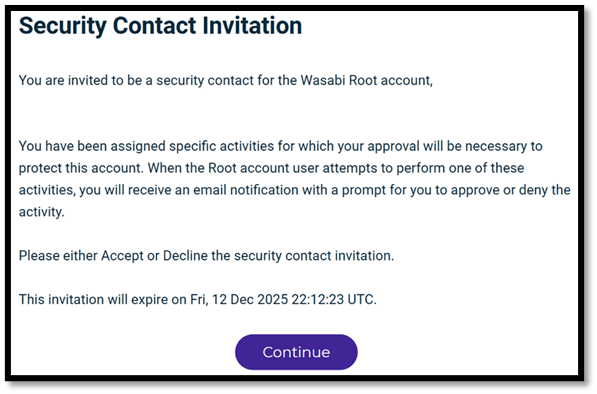
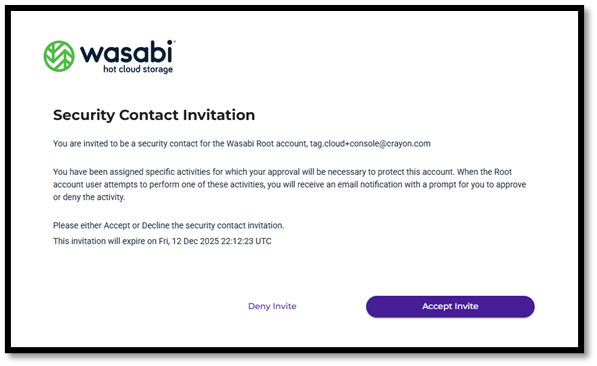

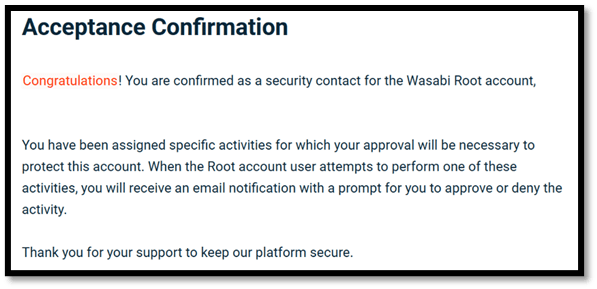
- The security contact will receive an email from Wasabi, and they will need to accept the invite and follow the acceptance process as shown above. The email invitation is only valid for 24 hours. You can add up to three security contacts, and all can perform different activities.
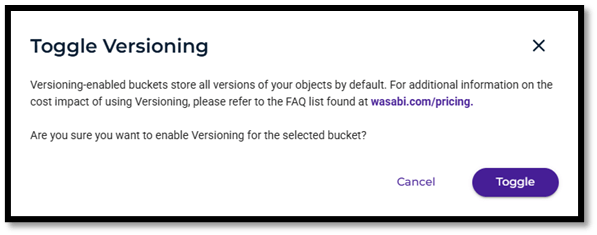
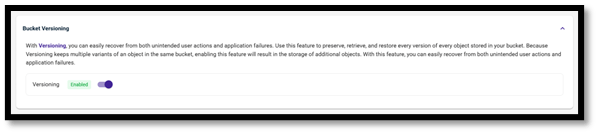
- Enable Bucket versioning as the last step to enable Covert Copy if this isn’t already enabled.
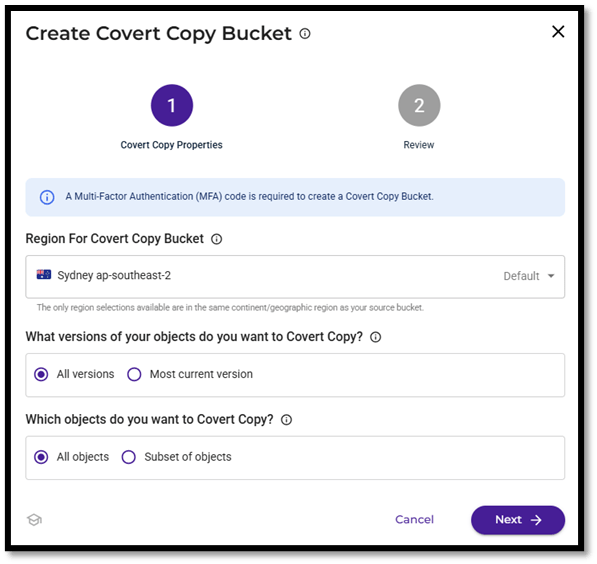
- The Covert Copy Bucket displays as above once MFA, MUA and Versioning issues have been resolved. Select the Region and what versions and objects you want to Covert Copy. Click Next.
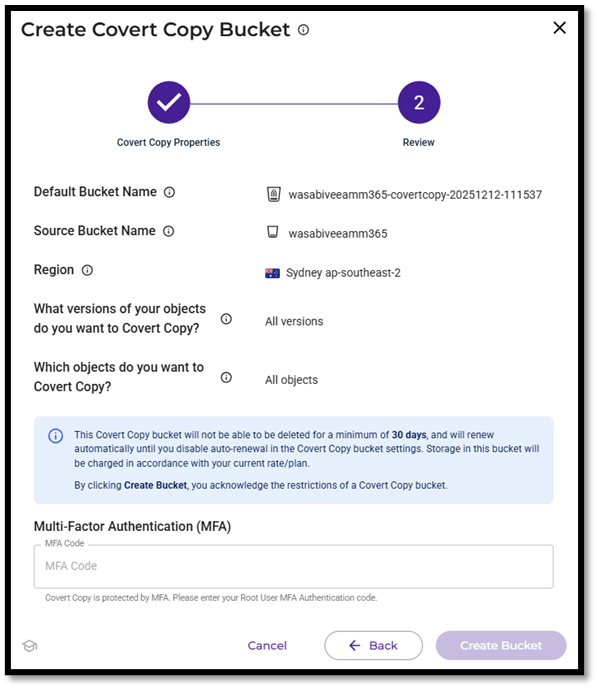
- Enter MFA code which is required to protect the covert copy bucket and then Create Bucket.
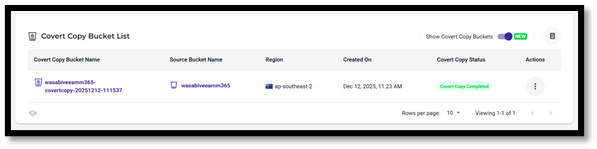
- The Covert Copy begins and displays “In Progress” and “Covert Copy Completed” once the copy has completed.
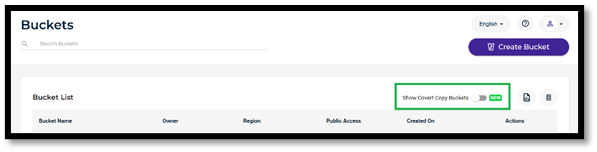
- The Covert Copy buckets are not displayed in the main Buckets List. The “Show Covert Copy Buckets” toggle needs to be enabled and this will only show the Cover Copy buckets.
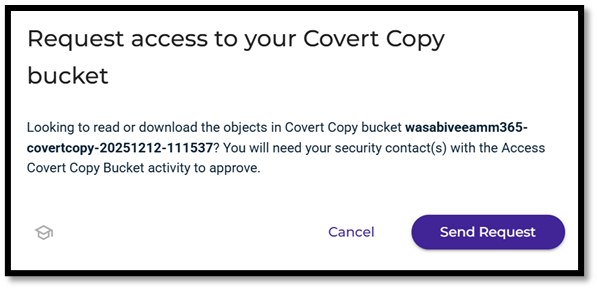
- If you need to access the Cover Copy bucket, you will need to request access from the Security contact. They will need to approve your request before you are able to gain access to the bucket.
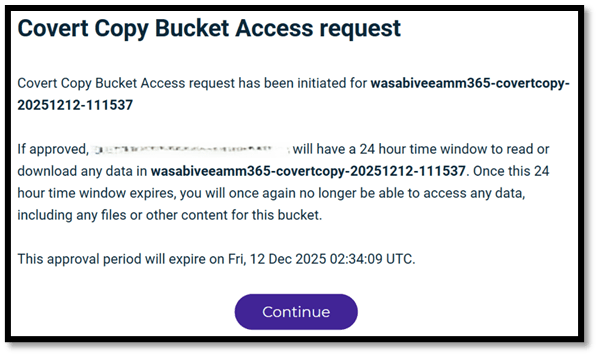
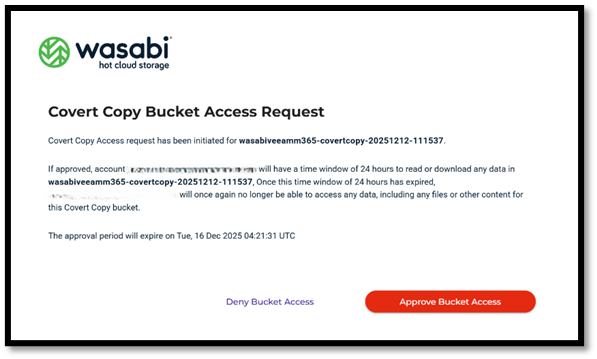
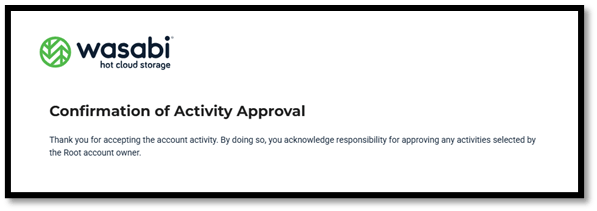
- The security contact will receive an email from support@wasabi.com and they will need to follow the process to approve the Covert Bucket Access as shown above. The access will only be for 24 hours.
Restoring from the Covert Copy Bucket using Veeam
To be able to restore the “Golden Copy” of your data from the Covert Copy bucket, you will firstly need to raise a Wasabi Support ticket to place the Covert Copy bucket into Restore Mode. This will make the Covert Copy bucket visible to Veeam when you are setting up the Veeam repository.
Only Wasabi Support can enable Restore Mode on the Covert Copy bucket otherwise the Covert Copy bucket will not be visible to Veeam or any other applications. The following process of restoring is done on Veeam v13 for Windows (Build 13.0.1.180).
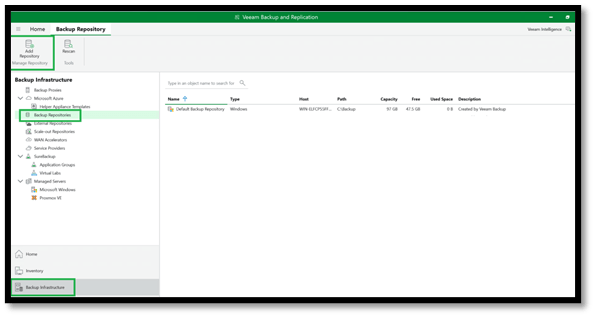
- Log into your Veeam console, go to Backup Infrastructure, click on Backup Repository and then Add Repository.
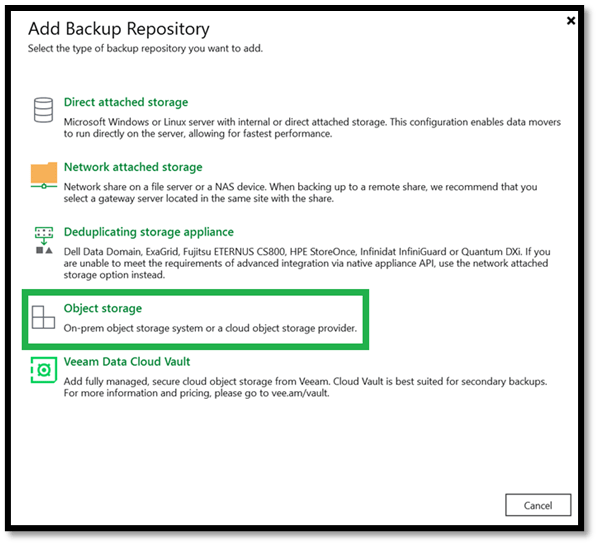
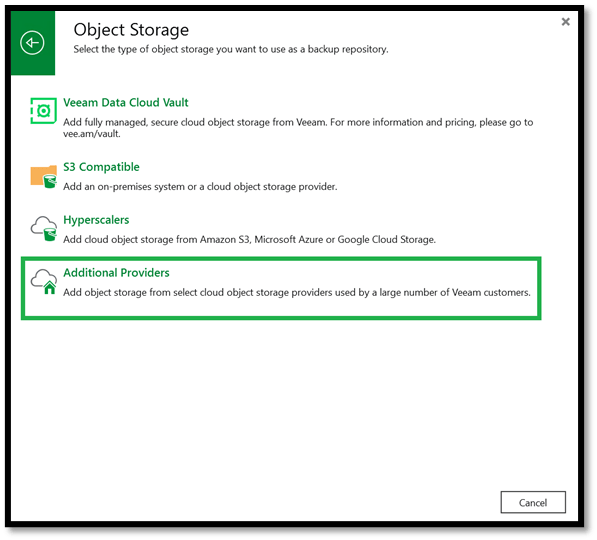
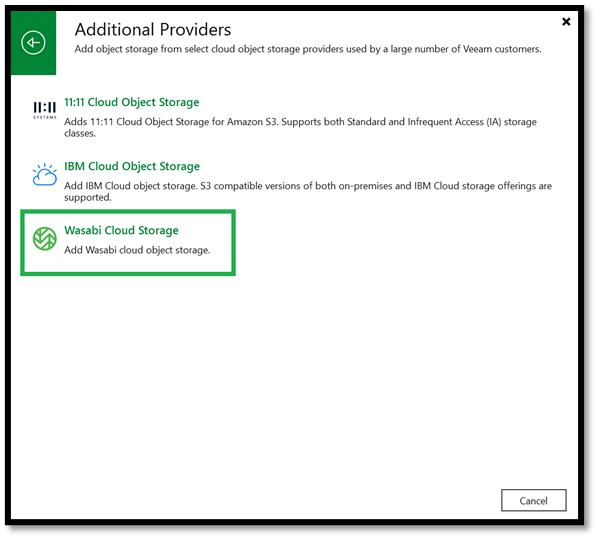
- Select Object Storage, then Additional Providers and select Wasabi Cloud Storage.

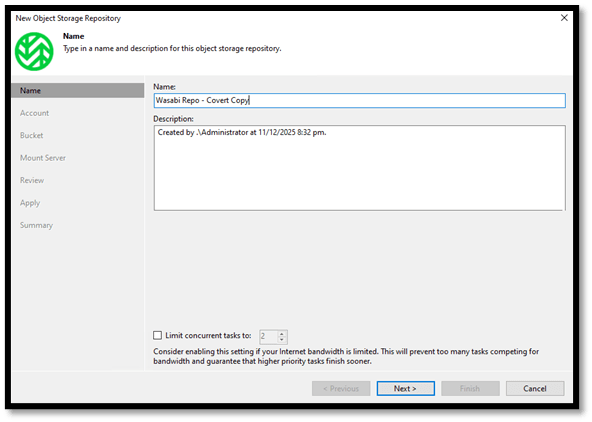
- Name the Wasabi Repository and Click Next.
- Enter the Region where the Covert Copy bucket is in and enter the root user credentials (Access and Secret Keys). Here’s a handy Wasabi Service URLs link – https://docs.wasabi.com/docs/what-are-the-service-urls-for-wasabi-s-different-storage-regions
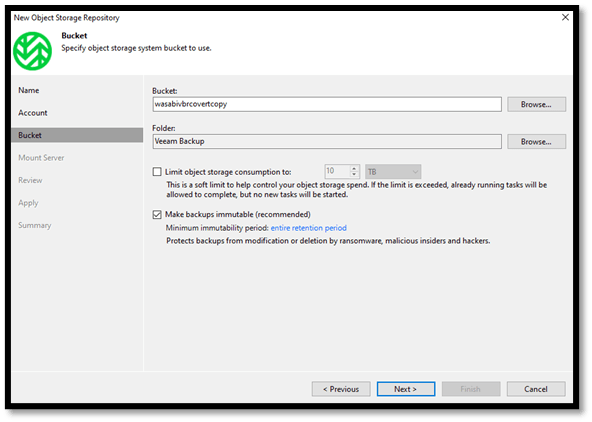
- Select the Covert Copy Bucket by clicking Browse and then select a Folder by clicking Browse.
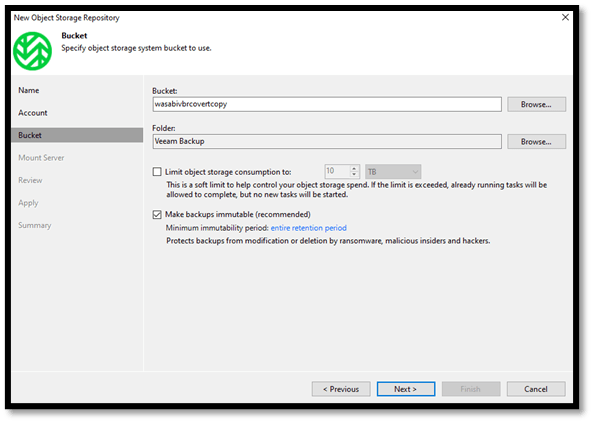
- Select the appropriate Mount Server to be used and the write cache folder if applicable.
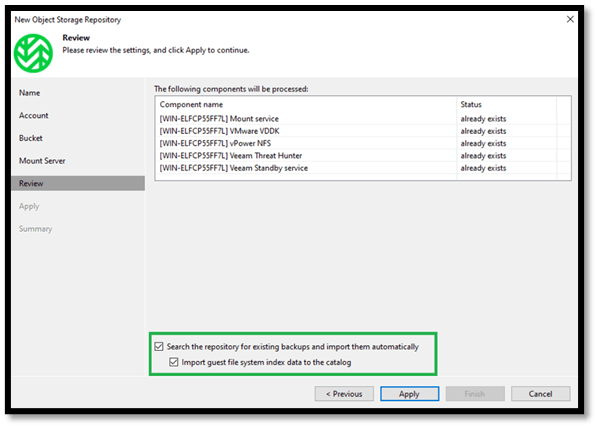
- Ensure the two check boxes are ticked so Veeam can search the Covert Copy bucket for any existing Backups and import it automatically. Click on Apply and Veeam will start the process of creating the Wasabi Covert Copy repository and search for backups in the bucket.
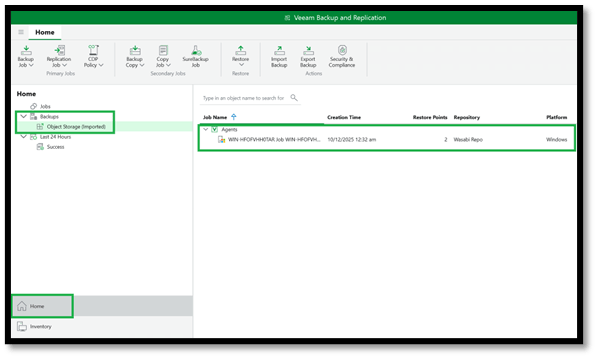
- You can now access the backups in the Covert Copy bucket under Home and Backups. It will be displaced as Object Storage (Imported) on the left-hand pane. On the right-hand side, the Jobs appear with the number of restore points you can select from.
In a threat landscape where attackers deliberately target backup infrastructure, cyber resilience can no longer rely on a single control or feature. By combining Veeam’s proven backup, recovery, and immutability capabilities with Wasabi’s Covert Copy, organisations move beyond traditional backup designs to an assume-breach architecture. Veeam delivers the speed, intelligence, and operational recovery required for day-to-day incidents, while Covert Copy provides a hidden, out-of-band layer of protection that remains intact even when credentials, repositories, or backup servers are compromised. Together, they create a true last line of defence, ensuring that when everything else fails, a clean, immutable recovery point still exists. This layered approach exemplifies what modern data resilience should look like.
Published: December 17, 2025 2:35pm
 Zamaan's Tech Blogs
Leave a comment