Cloud object storage has become an essential part of modern data protection strategies, and Wasabi Hot Cloud Storage is a go-to option for businesses looking for high performance at a low cost. One feature that’s often enabled in object storage buckets is versioning — a setting that retains previous versions of objects when they are overwritten or deleted.
At first glance, Wasabi versioning might seem like a simple backup solution. But relying on it as your only form of data protection is risky. Let’s break down why versioning is useful — and why it’s not a replacement for a full backup strategy.
✅ Why Enabling Versioning in Wasabi Is a Good Idea
1. Protection Against Accidental Overwrites or Deletions
If a user or system accidentally modifies or deletes an object, versioning allows you to recover a previous version. This provides a quick safety net for simple human or application errors.
2. Basic Ransomware Mitigation
In some cases, versioning may allow recovery from ransomware attacks that overwrite files — you can revert to an earlier clean version if versioning was already enabled and wasn’t compromised.
3. Audit and Change Tracking
Versioning allows you to maintain a history of changes over time. This can support auditing, compliance, and troubleshooting needs in regulated industries.
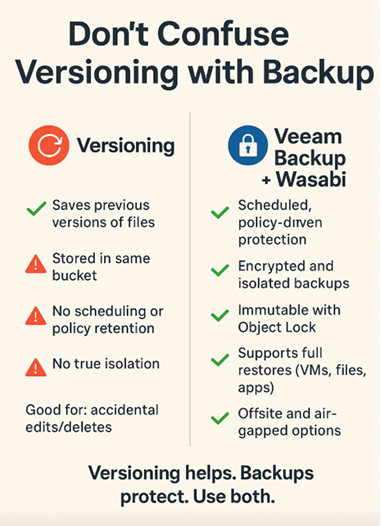
❌ Why Versioning Is Not a Backup
Despite its benefits, versioning lacks the critical features of a true backup solution:
1. It’s Still the Same Storage
Versioning retains multiple versions of an object in the same bucket, on the same storage infrastructure. If something happens to that storage (accidental wipe, credential compromise, region failure), all versions will be lost at once.
2. No Retention Policies or Scheduling
With versioning, there’s no backup schedule, policy control, or automation around how long versions are kept. Object versions accumulate until manually deleted, which can lead to ballooning storage costs or compliance gaps.
3. No True Isolation or Air Gap
Backups should be stored in a separate location, ideally with restricted access and immutability. Versioning does not isolate the previous versions — if someone with sufficient access deletes or corrupts a bucket, they can delete all versions too (unless Object Lock is used properly).
4. No Recovery Orchestration
Versioning lacks the tooling to perform structured restores of entire systems, applications, or file hierarchies. A backup solution like Veeam offers full recovery workflows, file-level restores, application-aware backups, and monitoring.
🛡️ Best Practice: Use Wasabi Versioning + Veeam Backup Together
Enabling versioning in Wasabi is a smart first line of defence, especially for frequently accessed or changing data. But it’s not a complete safety net. To truly protect your data, pair Wasabi with a purpose-built backup solution like Veeam Backup & Replication, which offers:
- Scheduled, policy-driven backups
- Encryption and immutability
- Offsite and offline backup tiers
- Application-consistent recovery
- Multi-version recovery across points in time

Versioning is a good safety feature — but it’s not a backup strategy. Think of it like an “undo” button in your document editor: helpful, but not something you’d trust for long-term data protection. To ensure your business can truly recover from data loss, corruption, or cyberattack, use Wasabi for scalable cloud storage, enable versioning for quick recovery, and implement Veeam for complete, reliable backups.
Published: July 30, 2025 5:06pm
 Zamaan's Tech Blogs
Leave a comment